
Scan Receipts in Seconds. AI Categorizes for Taxes.
The receipt scanner built for small businesses
Stop typing receipts into spreadsheets. SparkReceipt's AI scans any receipt — crumpled, faded, handwritten, or in any of 150+ currencies — and turns it into organized, tax-ready data in seconds. Generate expense reports in one click.
Business Owners in 80+ Countries Trust SparkReceipt


Stop Manual Receipt Entry
See what changes when AI handles your receipt scanning
Without a Receipt Scanner
- Receipts piling up in drawers, wallets, and glove boxes
- Manually typing amounts into spreadsheets or accounting software
- Missing tax deductions because receipts get lost or forgotten
- Tax time panic — scrambling to find a year's worth of receipts
- Paying your accountant to sort through bags of paper
With SparkReceipt
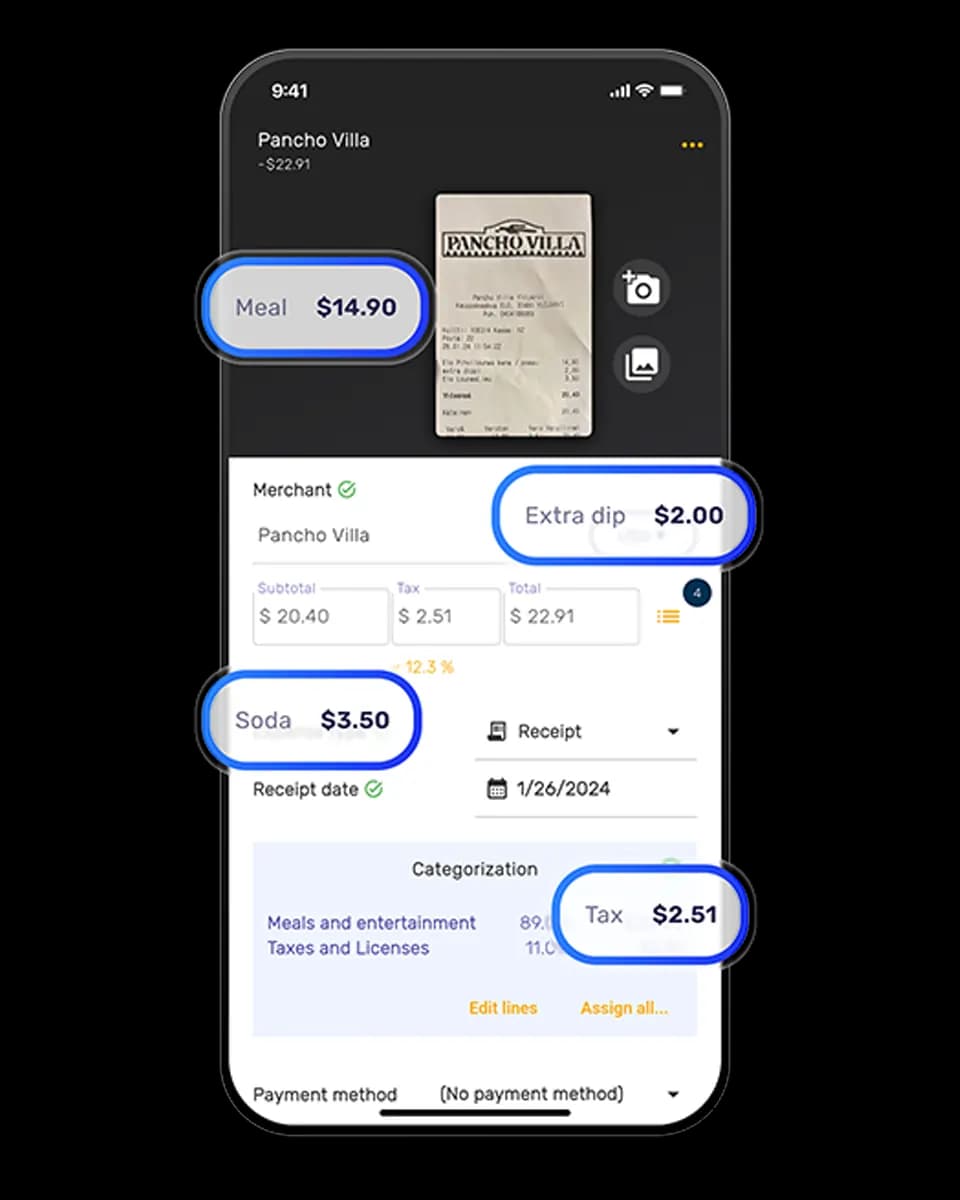
- Snap a photo — AI extracts vendor, amount, date, and tax instantly
- Expenses categorized automatically into tax-ready categories
- Every receipt stored digitally — never lose a deduction again
- One-click expense reports ready for your accountant or tax filing
- Invite your accountant or bookkeeper to your account at any time
How AI Receipt Scanning Works
Scan
Snap a photo of any receipt with your phone — even crumpled, faded, or handwritten ones. Upload PDFs or images from your computer. Forward email receipts or connect your Gmail, Outlook, or any IMAP inbox for automatic fetching. SparkReceipt handles receipts in any language and 150+ currencies.
Categorize
AI reads every receipt and extracts the vendor name, total amount, date, tax breakdown, payment method, and individual line items. Expenses are automatically categorized into tax-relevant groups — meals, travel, office supplies, software, professional services, and more.
Report
Generate clean expense reports in PDF, Excel, or CSV — with category breakdowns, tax summaries, and receipt images attached. Invite your accountant or sync directly to QuickBooks Online. Everything organized and ready.
Built for Small Businesses, Not Enterprises
Most receipt scanner apps charge enterprise prices for features small businesses don't need. SparkReceipt gives you AI-powered scanning, automatic categorization, and tax-ready reports — without the complexity or the price tag.
| Tool | Price | Notes |
|---|---|---|
| SparkReceipt Elite | $16.65/mo | 3 users included, unlimited scanning, simple pricing |
| Dext | $30+/mo | Designed for accountants, complex workflows |
| Expensify | $5/user/mo | Per-user pricing adds up fast |
One simple plan. No hidden fees, no surprise charges.
Loved by Small Business Owners
“SparkReceipt takes care of the busy work, allowing me to quickly save receipts and create expense reports.”

Tim Heller
HellerWeather · United States
“SparkReceipt is one of the very few software purchases that exceeded my expectations. It provides great reports, with easy edit options — it is going to save me a lot of work when I do my annual tax returns.”

Robert Connolly
The Internet Design Co. · Scotland
“Thanks to you, I'm actually looking forward to my year end FOR THE FIRST TIME EVER.”

Abigail Dombey
Net Zero Associates Ltd · United Kingdom
“SparkReceipt has been a game-changer for me! It's made organising my expenses and accounts effortless, saving me loads of time.”

Tracy Duggan
Business Coach · United Kingdom
“Excellent software to manage income and expenses, and have the relevant info at your fingertips at any given time.”

Melvin Hoods
MJD Brokers · South Africa
“I used to send my accountant a bag of slips every month. With SparkReceipt I now have a realtime view of how much the business owes me.”

Daniel Esterhuizen
Esterhuizen Consulting · South Africa
Frequently Asked Questions
Snap a photo of any receipt with your phone, upload a PDF or image from your computer, or connect your inbox for email receipts. SparkReceipt's AI extracts the vendor name, amount, date, tax, and payment method in 2–3 seconds. Expenses are automatically categorized into tax-relevant groups — no manual entry needed.
SparkReceipt Elite is $16.65/month, billed annually. The plan includes 3 users and unlimited document scanning, with a 7-day free trial.
Yes. SparkReceipt's AI is designed to read receipts in any condition — crumpled, faded, water-damaged, thermal, or handwritten. It also processes receipts in any language and 150+ currencies with automatic exchange rate conversion.
Absolutely. SparkReceipt automatically categorizes your scanned receipts into tax-relevant categories and generates expense reports in PDF or Excel format — ready for your accountant or tax filing. Digital receipts are accepted by tax authorities worldwide, including the IRS, CRA, ATO, and HMRC.
Yes. SparkReceipt integrates directly with QuickBooks Online and Xero — your categorized expenses and receipt images sync automatically. You can also export data in CSV or Excel for import into any accounting software.
Yes. Invite your accountant or bookkeeper to your account at any time. They can view all your scanned receipts, expense categories, and reports.