
Never Miss a Tax Deduction — Track Every Receipt Automatically
Every lost receipt is a tax deduction you'll never claim. SparkReceipt captures every business receipt — paper, email, or digital — and generates IRS-compliant reports in one click.
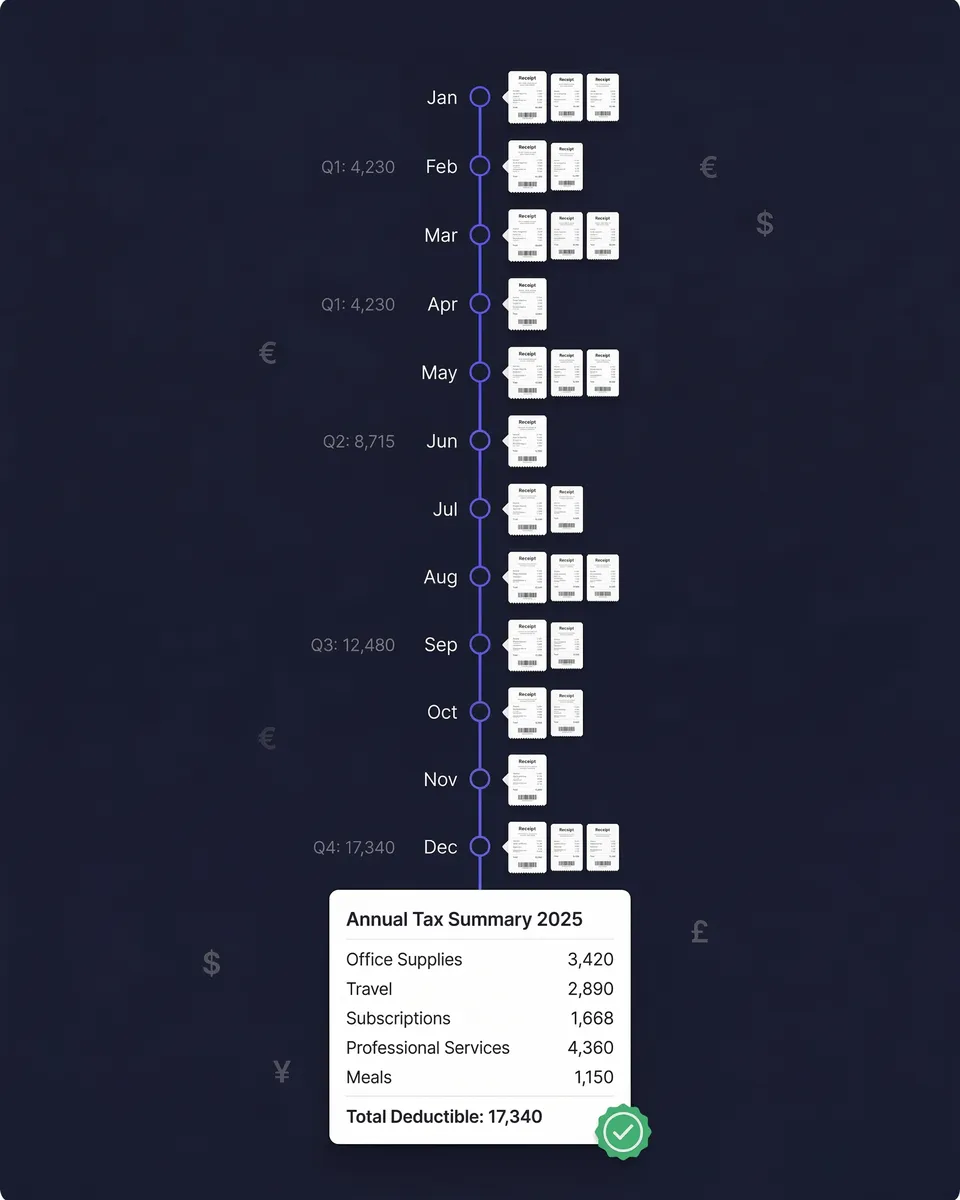
SparkReceipt captures every business receipt the moment you get it — paper, email, or digital. AI extracts the vendor, amount, date, tax, and currency, then categorizes everything into tax-ready expense categories. Generate IRS-compliant reports in one click. Share them with your accountant for free. Stop scrambling at tax time. Start tracking receipts year-round.
Business Owners in 80+ Countries Trust SparkReceipt


Receipt Tracking at Tax Time
See what changes when you stop losing receipts.

Without SparkReceipt
- Receipts crumpled in drawers, wallets, and car glove compartments
- Faded thermal paper receipts that are unreadable by tax time
- Email receipts buried across multiple inboxes and never found
- Scrambling to organize a year's worth of receipts in April
- Missing $2,000–$5,000 in tax deductions every year

With SparkReceipt
- Every receipt scanned and stored digitally the moment you get it
- AI extracts all details — even from crumpled and faded receipts
- Email receipts captured automatically from your inbox
- Tax-ready expense reports generated in one click, any time
- Every deduction accounted for — invite your accountant or bookkeeper
How Tax-Ready Receipt Tracking Works
Scan or Capture Every Business Receipt
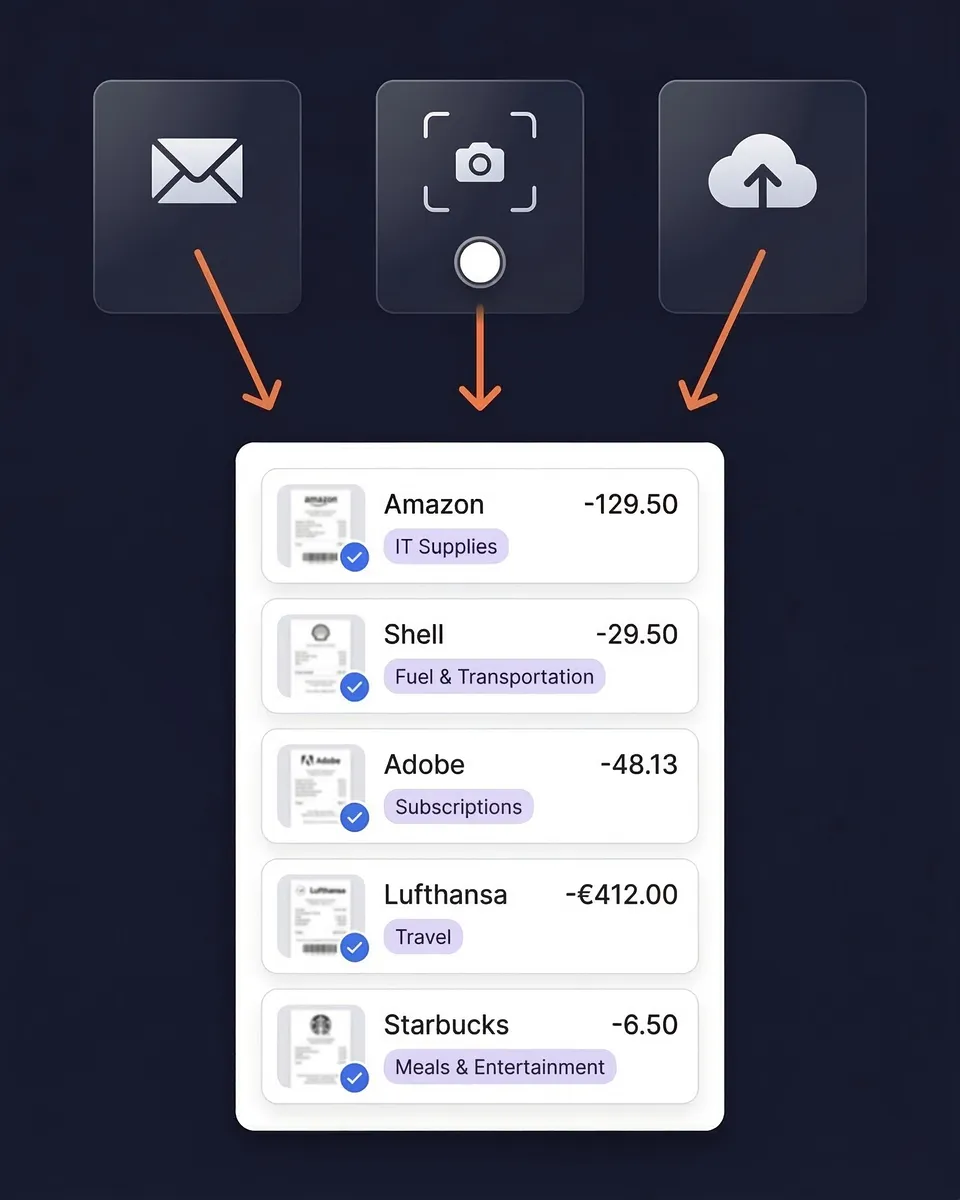
Snap a photo of paper receipts with your phone — the AI receipt scanner extracts vendor, amount, date, tax, and currency instantly. Works with crumpled receipts, faded thermal paper, and handwritten notes. The OCR reads receipts in almost any language.
AI Categorizes Into Tax-Ready Categories
SparkReceipt's AI automatically assigns every receipt to the right expense category — office supplies, travel, meals, software subscriptions, professional services, and more. Categories align with standard tax-filing requirements, so your records are organized the way your accountant expects them.
Generate Reports and Claim Every Deduction
Select any date range and generate a complete expense report — categorized totals, individual receipt images, and tax-relevant breakdowns. Export as PDF or CSV for your tax return. Sync directly to QuickBooks Online.
Digital Receipts Meet IRS Standards
The IRS has accepted digital receipts as valid tax documentation since 1997 under Revenue Procedure 97-22. Photos, scans, and digital copies are legally equivalent to paper originals — provided they're legible, accurate, and accessible.
SparkReceipt creates IRS-compliant digital records of every receipt. Each entry includes the original receipt image, AI-extracted data (vendor, amount, date, tax, currency), and the assigned expense category. Everything is stored with bank-level encryption and accessible from any device.
Stop Losing Digital Receipts in Your Inbox
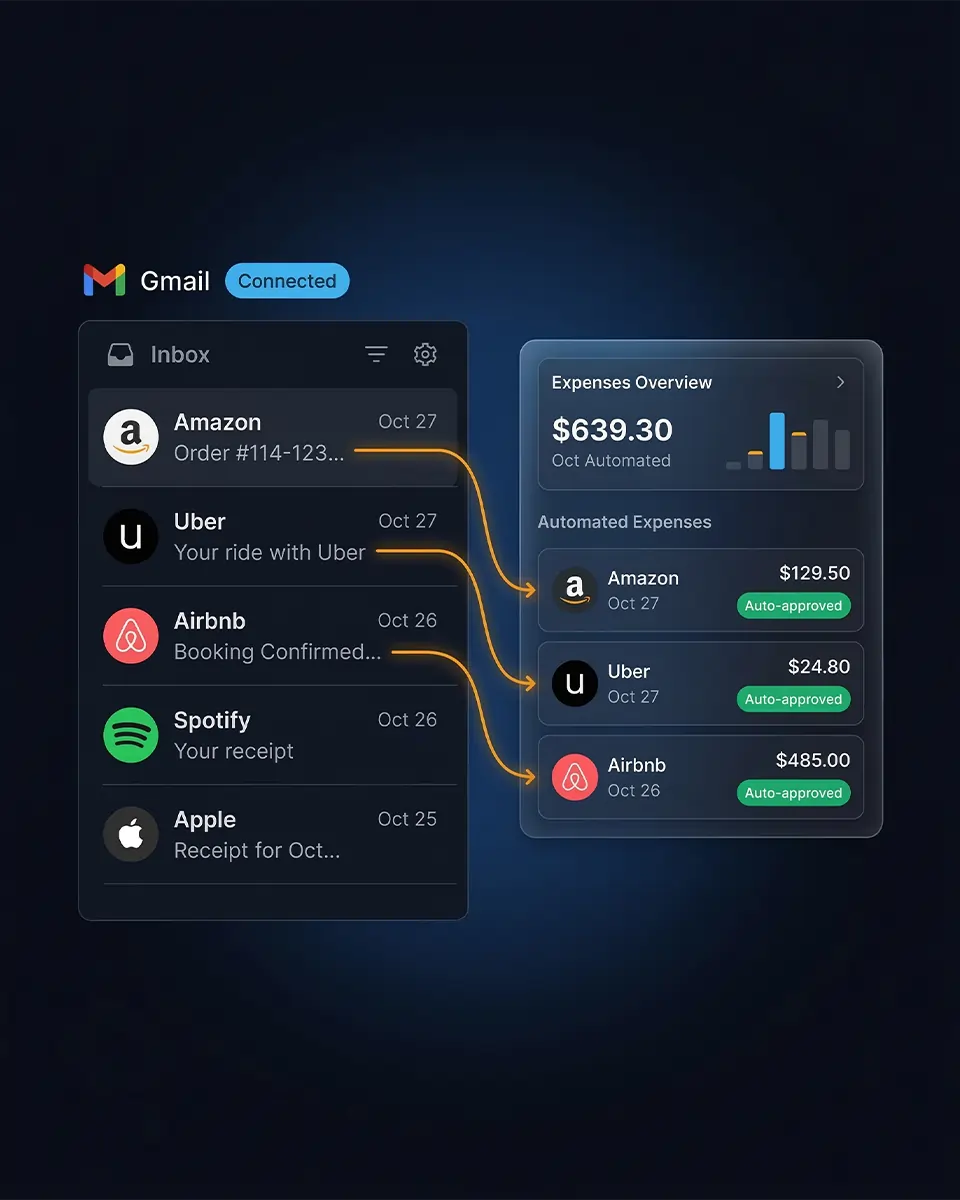
Most freelancers and small business owners receive dozens of email receipts every month — software subscriptions, cloud services, online purchases, travel bookings. At tax time, they're buried under thousands of other emails.
Connect your Google (Gmail), Microsoft (Outlook, Hotmail, Live), or any IMAP provider (Yahoo, iCloud, ProtonMail, and more), and SparkReceipt scans every incoming email automatically. Receipts and invoices are imported and processed by AI. Everything else is ignored. Every email receipt is scanned, categorized, and stored before it disappears into your inbox.
Track Receipts, Income, and Expenses — All in One Place
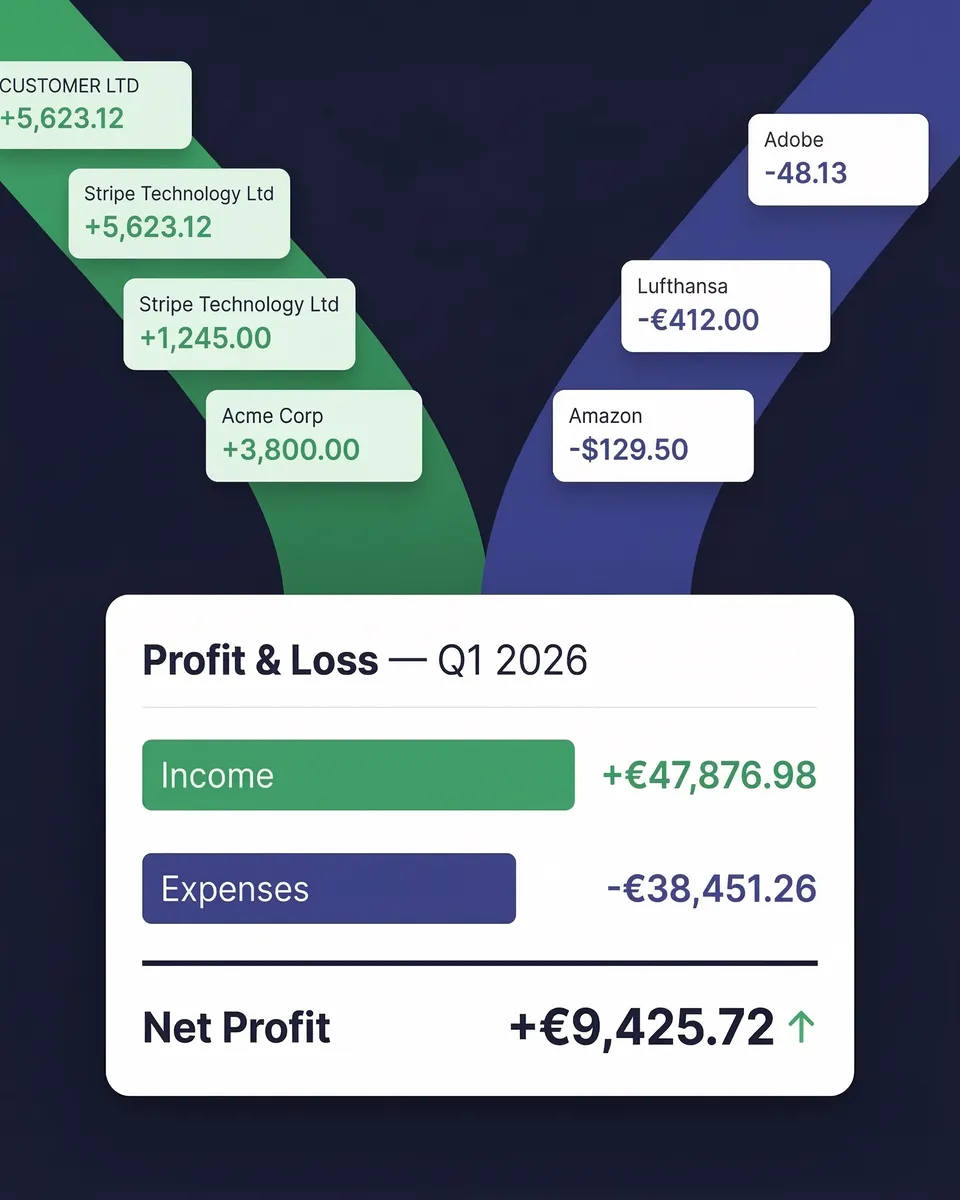
Tax preparation isn't just about receipts. SparkReceipt's income tracker captures revenue from invoices, payment confirmations, and bank statements — alongside your expenses.
Your monthly P&L report shows total income, total expenses, and net profit — exactly what you need for quarterly estimated taxes and annual tax filing. This is the pre-accounting layer that saves your accountant hours of work — and saves you money on their bill.
Receipt Tracking for Taxes
Simple, transparent pricing. No hidden fees.
Loved by Small Business Owners
“Excellent start and amazing team. Looking forward to making SparkReceipt my default expense management and accounting platform.”

Jon Aron
Logic Enterprises · Switzerland
“SparkReceipt has been a game-changer for me! It's made organising my expenses and accounts effortless, saving me loads of time.”

Tracy Duggan
Business Coach · United Kingdom
“SparkReceipt takes care of the busy work, allowing me to quickly save receipts and create expense reports.”

Tim Heller
HellerWeather · United States
Frequently Asked Questions
Yes. The IRS has accepted digital receipts as valid tax documentation since 1997 under Revenue Procedure 97-22. Digital records — including scanned images, photos, email receipts, and PDFs — are legally equivalent to paper originals, provided they are legible, accurate, and accessible. SparkReceipt creates IRS-compliant digital copies of every receipt you scan, stored securely with bank-level encryption.
The IRS requires you to keep receipts and supporting tax documents for a minimum of 3 years from the date you filed your return. Some situations require longer retention: 6 years if you underreported income by more than 25%, and 7 years for worthless securities or bad debt deductions. SparkReceipt stores your receipts digitally in the cloud with no storage limits, so your records remain accessible for as long as you need them.
Keep receipts for all business-related purchases, including office supplies, equipment, software subscriptions, travel expenses, meals (with business purpose noted), vehicle expenses, professional services, insurance premiums, rent, utilities, marketing costs, and contractor payments. The IRS expects documentation showing the amount paid, date, vendor, and business purpose. SparkReceipt's AI automatically extracts and categorizes this information from every receipt you scan.
A credit card statement proves payment was made, but it typically does not show what was purchased. The IRS may accept statements for routine business expenses, but for travel, meals, charitable donations over $250, and expenses requiring detailed substantiation, you need the itemized receipt. SparkReceipt captures and stores the full receipt image alongside the extracted data, giving you both the detailed record and searchable expense data.
For business travel, transportation, and entertainment expenses under $75, the IRS does not require a receipt — a written log noting the amount, date, location, and business purpose is sufficient. However, lodging receipts are required regardless of amount. Best practice is to capture every receipt. SparkReceipt makes this effortless — snap a photo in seconds, and the AI handles the rest.
Without receipts, the IRS can disallow the deductions you claimed, resulting in additional taxes owed, penalties (typically 20% of the underpayment), and interest charges. You may be able to use bank statements or cancelled checks as alternative documentation, but these are weaker evidence than original receipts. SparkReceipt prevents this by giving you a searchable, organized digital archive of every business receipt — always accessible, always audit-ready.
Yes. The IRS accepts photographs and scanned images of receipts as valid documentation, provided they are legible and accurately represent the original transaction details. SparkReceipt's AI-powered receipt scanner captures high-quality images and automatically extracts key data, creating a comprehensive digital record that exceeds basic photo documentation.
Common tax-deductible expenses for freelancers include: home office costs, equipment and supplies, software subscriptions, professional development, health insurance premiums, retirement contributions, business travel and meals (50% deductible), vehicle expenses, marketing and advertising, professional services, and payment processing fees. SparkReceipt helps you track all deductible categories and generates reports that align with Schedule C tax filing requirements.
SparkReceipt's Elite plan is $16.65/month, billed annually ($199.98/year), with a 7-day free trial. Compare this to Dext ($27–$80/month), Neat ($200+/year with annual commitment), and Shoeboxed (with overage charges). SparkReceipt includes AI receipt scanning, automatic categorization, email receipt capture, bank statement extraction, expense reports, and QuickBooks integration.
Yes. Invite your accountant or bookkeeper to your account at any time so they can view your organized receipts, categorized expenses, and expense reports. This makes tax preparation faster, as your accountant spends less billable time organizing your records.
Stop Losing Receipts. Start Claiming Every Deduction.
Get StartedExplore More Features
Receipt Scanner
AI-powered receipt scanning in seconds
Expense Tracker
Track every business expense automatically
Email Receipts
Auto-import receipts from your inbox
Expense Reports
Generate reports in PDF, Excel, or CSV
Income Tracker
Track every dollar of business income
Bank Statement Extractor
Extract and match bank transactions