
Receipt Scanner for Consultants & Agencies
Track client expenses, travel receipts, and billable costs — organized by project.
Consultants and agencies juggle expenses across multiple clients, projects, and trips. SparkReceipt's AI scans every receipt, categorizes it by client or project, and generates professional expense reports you can bill back or file with your taxes.

Business Owners in 80+ Countries Trust SparkReceipt


Stop spending billable hours on expense paperwork
Client-Ready Expense Reports in One Click
Client dinners, conference tickets, cab rides to meetings — every project generates dozens of receipts that need to end up on an invoice or a tax return. SparkReceipt scans each one, tags it to the right client, and generates polished expense reports in PDF, Excel, or CSV — complete with receipt images attached. Bill clients accurately and file taxes confidently.

Invite them in, sync to QuickBooks, keep everything tidy
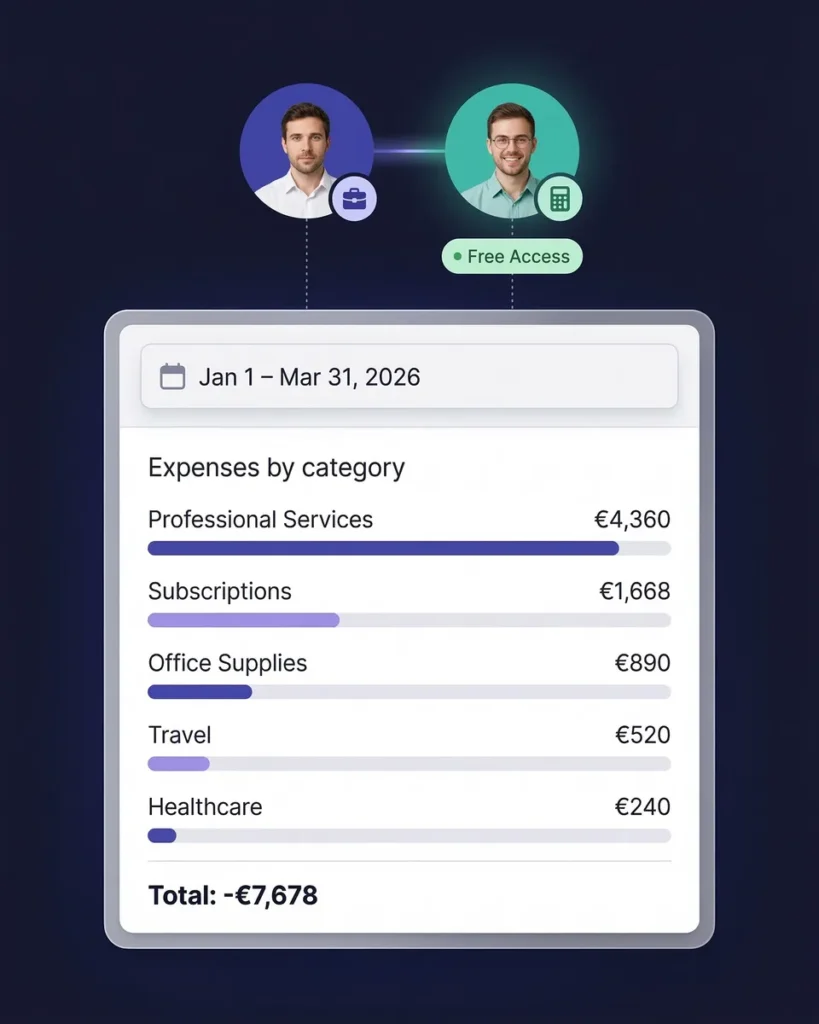
Collaborate With Your Accountant in One Workspace
Your accountant shouldn't have to chase you for receipts. Invite them to your SparkReceipt workspace and they get instant access to organized, categorized expenses — no more emailing spreadsheets or mailing shoeboxes. Sync directly to QuickBooks Online so your books stay up to date without manual data entry.
How It Works for Consultants
Scan Client Meeting and Travel Receipts
Snap a photo of any receipt — client dinners, flights, hotels, Uber rides, conference fees. SparkReceipt's AI extracts vendor, amount, date, and category in seconds. Forward email receipts and they're processed automatically.
AI Sorts by Client, Project, and Category
Every receipt is automatically categorized by expense type — meals, travel, software, professional development. Tag each expense to a specific client or project for per-engagement cost tracking.
Generate Reports for Clients or Tax Filing
One click generates a complete expense report for any client or project — with totals, category breakdowns, and attached receipt images. Export to PDF, Excel, or CSV. Bill clients directly or hand to your accountant for tax filing.
Loved by Small Business Owners
“SparkReceipt has simplified our expense tracking significantly. Everything is organized and accessible when we need it.”

Daniel Esterhuizen
Esterhuizen Consulting · South Africa
“A very useful tool for managing expenses. The interface is clean and the AI extraction works remarkably well across different receipt formats.”

Rafael Roa
System Arquitectura · Spain
“I needed a solution to organize and process my personal and business receipts. I'm thrilled I found SparkReceipt. It saves me a lot of time!”

Frédéric Thériault
Productions Locavores · Canada
Still Tracking Client Expenses Manually?
See what changes when AI handles your business receipts
Without SparkReceipt
- Client receipts mixed with personal expenses in your wallet
- Forgetting to bill clients for project-related expenses
- Hours reconstructing expenses at month-end or tax time
- Missed deductions on meals, travel, and software subscriptions
- Paying your accountant to sort through unorganized receipts
With SparkReceipt
- Every receipt scanned and tagged to the right client instantly
- AI extracts vendor, amount, date, and category automatically
- Per-client expense reports ready to bill in one click
- Every deductible expense tracked — meals, travel, software, and more
- Invite your accountant — tax data organized year-round
Frequently Asked Questions
Yes. SparkReceipt lets you tag every receipt and expense to a specific client or project. You can filter, search, and generate reports by client at any time — so you always know exactly how much each engagement is costing you and what to bill back.
You can tag any receipt as personal or business when you scan it, or let AI suggest the category based on the vendor. You can also create separate workspaces to keep personal and business expenses completely isolated.
Yes. SparkReceipt generates polished expense reports in PDF, Excel, or CSV — complete with receipt images, vendor names, amounts, dates, and categories. Filter by client and date range, then export a report ready to attach to your invoice.
Yes. SparkReceipt supports over 150 currencies and automatically extracts the currency from each receipt. Whether you're scanning a taxi receipt in Tokyo or a hotel bill in London, AI handles the extraction accurately.
Yes. SparkReceipt syncs with QuickBooks Online, so your categorized expenses and receipt images flow directly into your accounting software. You can also export to Excel, CSV, or PDF for any accounting workflow.
Common deductible expenses for consultants include client meals, travel (flights, hotels, car rental), professional development, software subscriptions, office supplies, insurance, marketing, and home office costs. SparkReceipt helps you capture and categorize all of them so nothing is missed at tax time.
Yes. You can invite your accountant or bookkeeper to your SparkReceipt account. They get full access to your organized, categorized receipts and can generate or export reports directly — no more emailing spreadsheets back and forth.
SparkReceipt costs <Price plan="elite" cadence="annual" display="annual" />/year with all features included. There are no per-user fees, no per-receipt charges, and no hidden costs. Start with a 7-day free trial.
Simple, Transparent Pricing
One flat price. No per-user fees. No hidden costs.